LCD Display for Pinball Williams Sys9 – Sys11 and DataEast.
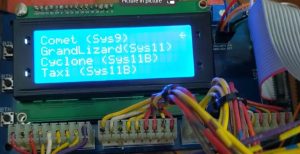
What is this LCD pinball display decoder?
The LCD Display is a small compact display that can be used to diagnose a pinball machine that does not have a display or is having display problems. It can be used on a bench tester. It has been tested on Williams System 9 and Williams System 11 machines. DataEast is also compatible with Williams displays but this has had minimal testing. It would be perfect for a pinball technician or a bench because you would not be required to buy all of the various displays that are required for all of these different machines. It is low voltage, 5v, so it is safer than the original 90v plasma displays. You can play a game and view the display and go through the audit menu’s to help diagnose a machine. I have also included a Strobe input tester. The display only utilizes strobes 1 and 9 for the game displays and the strobe input tester will help you determine if a strobe input is having an issue.
Who is it made for?
A Technician. Although it’s essentially plug ‘n play, you need some technical ability.
Who is it not made for?
If you have never changed a display in your game, you don’t know how to navigate through the testing and audit menus, can’t locate the display cables on the MPU, can’t supply 5v power, can’t keep from shorting out the boards, or don’t own any of the pinball machines listed or related MPU’s, then this is not for you. If you have one game that has a display that is not working, just go buy another display made for the game, not this one.
What it is not.
It is not a direct replacement for your display. This display decodes most characters but not all. 16 segment displays (14 segment plus a comma and a period) can display up to 65,636 (2^16) different characters. The LCD screen does not have a character set to cover all of these variations and I did not define any character that was either not available or not used.
What else do you need to utilize the display?
You need a compatible pinball machine. You need display and strobe cables that are originally used in the machine. No custom cables are required. You need a 5v power source. This can be separate 5v power supply or you could utilize the 5v and ground posts available on the MPU and connect alligator clips to the posts and wires to the display.
The display has been tested with these games: Comet, Grand Lizard, Cyclone, Taxi, Whirlwind, Dr. Dude. Any other game that utilizes the same display should be compatible but it has not been confirmed unless indicated below. DataEast Robocop is listed in the menu because the display is the same as Whirlwind but with the bits reversed. Robocop has not been confirmed working properly, but it should be.
Instructions:
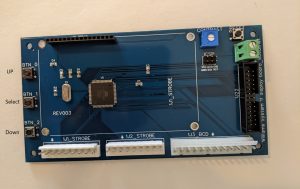
Button navigation:
BTN_0: Up, BTN_1: Select, BTN_2: Down. Reset will bring you back to the main menu.
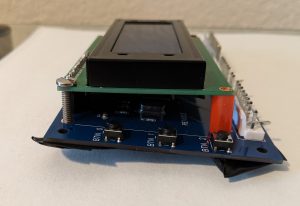
Connect the LCD display to the board. I recommend that you use screws and posts to attach the LCD so that it does not get disconnected and so that the connections don’t become loose. The LCD is a HD44780 compatible display with male headers. If it ever breaks, you can buy another.
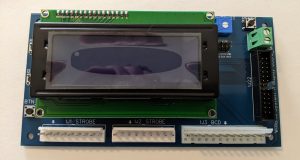
I suggest that you bend the plastic plug connectors back where they latch. I may have already done this when testing. They are very stiff and can make it difficult to plug and unplug a connection.
Recommendations:
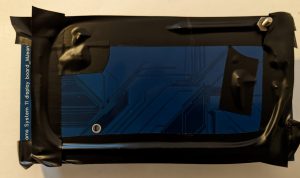
Cover the back of the board with electrical tape or some other protection to prevent any shorts that could be caused by touching metal on the games.
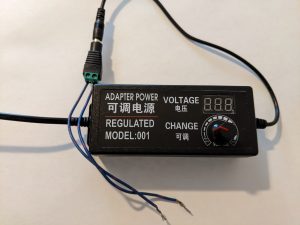
You can use a 5v power supply like the one above or power from the MPU. This one is a variable power supply. If you use one that can provide more than 5v, make sure you do not supply more than 5v, which could damage the board. Connect power to the large green screw terminals on the right side of the board labeled 5v and GND.
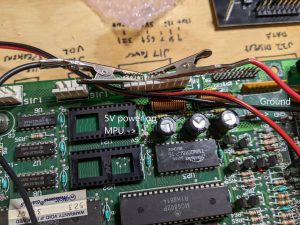
MPU 5v power sources indicated above.
What to do if the display is not displaying characters?
Adjust the Contrast pots switch. Check the male connector on the LCD. Check male header pins on LCD and make sure they are plugged in all of the way. Use a screw to attach to keep it plugged in. A solder joint may be loose. Check header pins solder. Select the reset button.
What to do if I select a Menu and then no characters are displaying?
Make sure you are connected to the strobe cables that are connected to the MPU on the other end. Select the Strobe Test menu. You should see activity. If not, your cables are not connected correctly or the system is locked. No strobes, no display data.
Games that are potentially compatible with the display. Ones with * have been confirmed. I am updating with notes once they are tested. I may update future code based on results.
Comet (sys9) *
Space Shuttle
Sorcerer
Grand Lizard (Sys11 / Sys11a) *
High Speed * (Attract mode has reverse characters that are not in the LCD character set)
Road Kings
Pinbot
Millionaire
F-14 Tomcat
Fire!
Cyclone (Sys11b) *
Big Guns
Space Station
Banzai Run
Swords of Fury
Taxi (Sys11b) *
Police Force (Jackpot may not display, may need to create new code for this one)
Jokerz!
Earthshaker
Black Knight 2000
Transport the Rescue
Elvira and the Party Monsters
Bad Cats *
Mousin’ Around!
Whirlwind (Sys11b) *
Dr. Dude (Sys11c) *
The Bally Game Show
Pool Sharks
Rollergames *
Diner
Radical!
RIverboard Gambler * (Only one Jackpot display may display. May need to create new code for this one)
Bugs Bunny’s Birthday Ball
Data East:
(Use Cyclone on Menu for the following)
Playboy 35th Anniversary
Secret Service * (Works but fourth display with Cred would work better with timing adjustment)
Time Machine
Torpedo Alley
Robocop (Available on menu. Select this one for the following games. Unconfirmed)
Back to the Future
Monday Night Football
Phantom of the Opera
The Simpsons
Games on the menu with the same display as the other compatible games may have some missing decoded characters because they were not designed directly for these. If there is interest, I will continue to add more games and additional decoded characters.
Youtube videos:
Menu navigation: https://www.youtube.com/watch?v=ku0-9HkDfd8
Whirlwind: https://www.youtube.com/watch?v=nO03pvLdg2w
Strobe input tester: https://www.youtube.com/watch?v=D2N2TyAW9dA
Taxi connected to game: https://www.youtube.com/watch?v=yJaK77moe9g
Comet Sys9: https://www.youtube.com/watch?v=tX-cgBnaOWY
Cyclone: https://www.youtube.com/watch?v=h5GSAtJPfW8
Grand Lizard: https://www.youtube.com/watch?v=DpeSSFaNDxA
Purchase will be by request. Send email to: support@mattsmerchandise.com